
Build a Free Calculator That Attracts Buyers for Your MicroSaaS
A free tool works as marketing when it helps the same person who would buy your product. An entertaining widget with no connection to the paid workflow may attract visitors and still bring you no customers.
HubSpot's Website Grader is a public example of a tool that provides an assessment related to its broader marketing offering. You do not need to copy the scale or the category. You need the same connection between the free result and the paid next step.
This guide extends our mini-app marketing article with a concrete calculator design and a measurement plan.
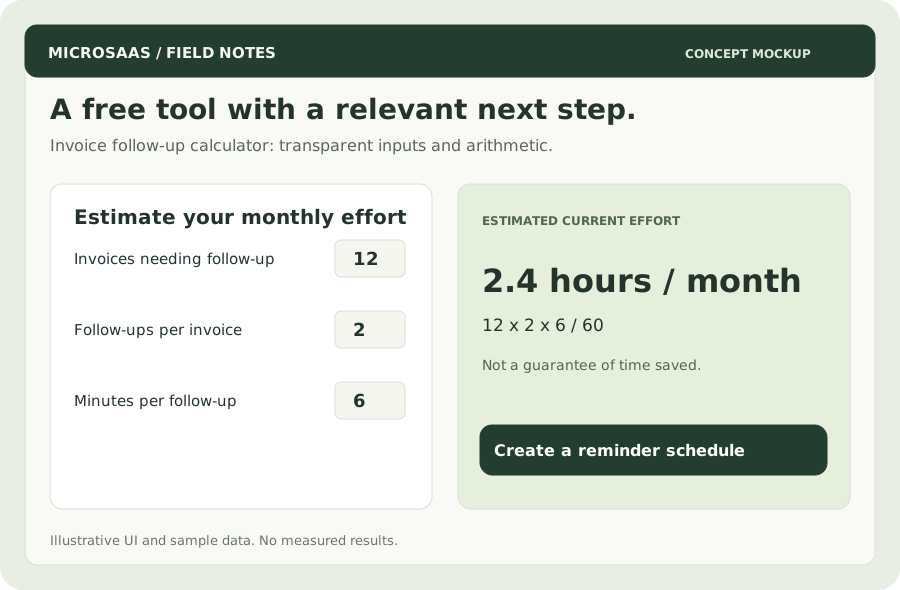
Concept mockup: an invoice follow-up calculator. Its output is an estimate of current effort, not a promise of savings.
Start with the paid job
Imagine an illustrative MicroSaaS that helps freelancers schedule polite reminders for unpaid invoices. Its free tool might estimate how much time a freelancer spends preparing follow-ups each month.
The connection is direct: someone doing this work manually may want help organizing it. A generic compound-interest calculator would reach a much wider audience with much weaker intent.
Use this filter before building:
| Question | A useful answer |
|---|---|
| Does the buyer recognize the problem? | They can describe the last time they did it |
| Can they answer the inputs? | The inputs come from their own workflow |
| Is the result immediately useful? | It helps quantify effort or make a choice |
| Does the next step fit? | Your product addresses the same recurring task |
A calculator should not demand an email address before showing the basic result. Let its usefulness earn attention first.
Make the arithmetic inspectable
Ask for three inputs:
- Number of invoices requiring follow-up per month.
- Average number of follow-ups for each of those invoices.
- Minutes spent preparing and recording each follow-up.
The formula is:
monthly follow-up hours =
  invoices requiring follow-up × follow-ups per invoice × minutes per follow-up / 60
With 12 invoices × 2 follow-ups × 6 minutes, the estimate is 2.4 hours per month. These are fictional inputs. The output describes the user's estimate of current effort, not what your product will eliminate.
An optional hourly value of €40 gives 2.4 × €40 = €96 of estimated time value. That is not cash recovered or guaranteed extra revenue. Label it accordingly and explain the assumptions next to the result.
If you add an estimated automation percentage, make it user-adjustable. A 50% reduction would mean 1.2 hours in this example, but only the customer's real usage can validate it.
Ship a small, fast first version
A static page with browser-side arithmetic is enough for this tool. You do not need a database or AI inference to multiply three numbers.
Download the formula worksheet to review inputs and outputs before coding. Test these cases:
- Zero overdue invoices produces zero hours.
- Empty input shows a helpful prompt, not
NaN. - Negative values are rejected.
- Decimal minutes work and output is rounded only for display.
- Large values do not break the layout.
- Labels, inputs, and the result work with a keyboard and on a phone.
State whether the inputs leave the browser. If the first version calculates locally, keep analytics free of the entered financial values. If you later store estimates, update the explanation to match the actual behavior.
Put one relevant action beside the result
Suggested call to action:
Want a repeatable follow-up workflow? Create a reminder schedule for one invoice.
The free tool quantifies effort; the product manages the workflow. That is a natural handoff. A forced newsletter signup or unrelated discount makes the next step harder to understand.
Let people copy or share the result. Shared output can include a small attribution link, but do not leak invoice details or contact information into a public URL.
Measure what happens after the calculation
Use a short funnel:
tool_viewed → calculation_completed → product_cta_clicked
→ signup_completed → first_reminder_scheduled → subscription_started
Count unique visitors or accounts consistently. Distinguish a recalculation from a new visitor and avoid recording the same purchase on a page reload. Carry a source identifier into signup so you can connect tool usage with the downstream account.
In a fictional monthly sample, 200 visitors produce 100 calculations, 20 product clicks, 6 signups, and 1 paying customer. Tool-to-paid conversion is 1 / 200 = 0.5%. That is illustrative arithmetic, not a forecast. One purchase is too little evidence for a reliable acquisition estimate.
Track acquisition source, time spent maintaining the tool, and whether the resulting customers use the product. A calculator that brings a thousand irrelevant visitors can be less valuable than one that brings twenty qualified buyers.
Publish where the problem already exists
Create a focused page answering “How much time do invoice follow-ups take?” Explain the formula, show a worked example, and link to the relevant product. Share it in places where that question is already being asked, respecting community rules.
Start with one useful calculator. Add variations only when each answers a different real question with meaningful input or data. If visitors calculate but never click, investigate the connection to your paid workflow before creating ten more tools.


