
From Vibe-Coded Demo to Paying Customers: The MicroSaaS Launch Checklist
A demo proves that a happy path can work. A paid product has to handle expired sessions, interrupted jobs, payment failures, and a customer clicking the same button twice.
You do not need enterprise infrastructure to launch a small SaaS. You do need evidence that the core promise works outside your own account. Use this checklist after building with Lovable, Firebase, or another stack.
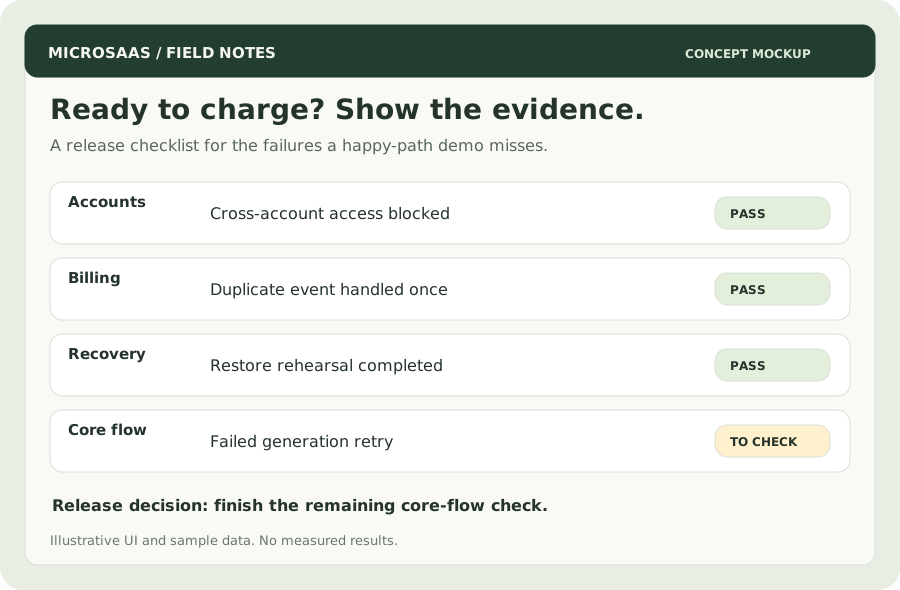
Concept mockup: release readiness is based on checks you ran, rather than a percentage guessed from completed features.
1. Rehearse the entire customer journey
Use a new browser session and a brand-new account. Follow the route a stranger will take: landing page → signup → first useful result → payment → next visit → cancellation.
For an illustrative proposal-to-checklist product, success means a customer can upload a supported file, inspect an editable checklist, save it, and return to it later. A successful API response alone does not establish that outcome.
Download the launch checklist. Give every check an owner, a result, and a link to evidence. A screenshot, delivery log, or restore record is more useful than “done.”
2. Separate authentication from authorization
Login tells you who the user is. Authorization determines which records they may read or change. Check both.
Create accounts A and B. As B, try requesting A's document by changing the record ID in the URL or API request. Check downloads, exports, search, and background jobs too. Every data route must enforce ownership or workspace membership on the server.
The OWASP Authorization Cheat Sheet recommends denying access by default and checking permissions on every request. Hiding a button does not protect its endpoint.
3. Make billing survive retries
Keep payment-provider keys on the server. Separate test and live credentials. Confirm what grants access, what removes access, and how customers manage their subscription.
For Stripe webhooks, the official guidance covers signature verification, duplicate deliveries, and event ordering. Verify the signature using the raw request body. Persist accepted events durably before acknowledging work that must survive a crash. Handle repeated events without repeating side effects, and reconcile subscription state when delivery order changes.
Test these cases:
- A completed checkout grants the intended access.
- A duplicate delivery does not grant credits twice.
- A failed renewal follows your documented grace-period policy.
- Cancellation preserves access until the agreed end date, if that is your policy.
- A delayed notification can be reconciled with the provider's current state.
The policy must match the product. Write it down before asking AI to implement it.
4. Design the failure screen before you need it
An interrupted generation should not leave a permanent spinner. Use explicit states: queued, running, completed, and failed. Keep a job identifier so users can return after closing the page.
| Failure | Customer sees | System does |
|---|---|---|
| Unsupported file | Supported formats and a correction path | Rejects before expensive processing |
| Provider timeout | Job status and a retry option | Records the failure and applies bounded retries |
| Repeated click | The existing job | Prevents duplicate work using a request key |
| Usage limit reached | Current usage and reset date | Enforces limits on the server |
A retry should reuse already completed work where possible. State whether a failed attempt consumes credits. Do not quietly charge for an output the user cannot retrieve.
5. Restore a backup, not just create one
Decide what you would need after losing the database: customer records, saved output, subscription references, and essential configuration. Keep secrets out of logs and screenshots.
Run a restore into a separate environment. Verify that a known document belongs to the correct account and can be opened. Record the restore duration and the age of the backup. Those observations tell you what recovery actually looks like.
An illustrative target for a low-volume product might be a daily backup and recovery within a working day. A tool customers depend on hourly needs a different plan. Choose based on the cost of losing work, not the size of your company.
6. Launch to a small group with support ready
Before inviting paid customers, check:
- A support address is visible and receives mail.
- Password recovery and transactional emails arrive.
- You can find a failed job by ID without exposing its contents.
- Customers can export their work and request deletion.
- Billing terms, cancellation, and data handling are explained accurately.
- The app works on a phone and with keyboard navigation.
- You know how to roll back a release.
Start with a few users and observe their first useful result. Fix repeated failures before widening the launch. A smaller feature list with a dependable core workflow is enough to begin charging; a successful demo with no recovery path is not.


